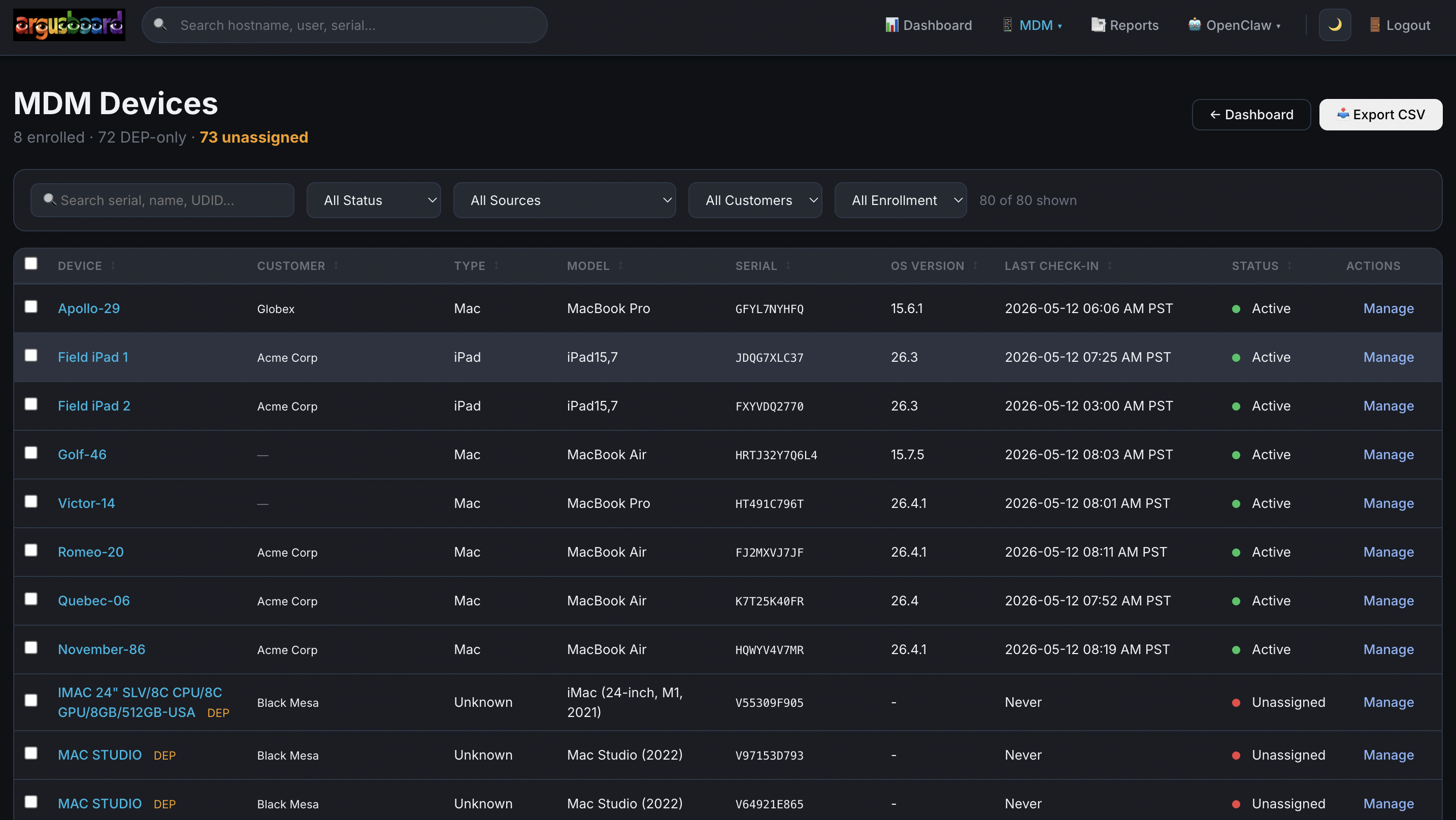
Unified device list
All enrolled Macs, iPads, and iPhones in one table. Apple model identification, macOS/iOS version, and enrollment status visible at a glance.

Purpose-built Apple device management for MSPs. Enrollment, profiles, commands, smart groups, compliance, DEP/ADE, ABM, and VPP. Not a bolt-on to a Windows MDM. Not a separate console. Built for Apple from the ground up.
See every enrolled Mac, iPad, and iPhone. Filter by customer, Apple model, macOS/iOS version, or enrollment status. Act on individual devices or in bulk.
All enrolled Macs, iPads, and iPhones in one table. Apple model identification, macOS/iOS version, and enrollment status visible at a glance.
Grouped info panels: Hardware, Device Info, MDM Status, and Installed Apps. DEP metadata, enrollment info, and compliance state all surfaced.
Filter devices by ABM tenant mapping. See only the devices that belong to a specific client.
Visual device mockups by device family. MacBook, iMac, iPad, iPhone rendered in the device header for quick visual identification.
Inline name editor on device pages. Override the MDM-reported name with your own label. Changes push to the device via MDM Settings command.
Full app inventory from InstalledApplicationList. Collapsible with state persisted in localStorage across page refreshes.
Full command interface with end-to-end tracking. Queue commands, push via APNs, and see results come back with status and payload data.
Destructive actions are clearly separated with confirmation prompts and context-aware UI.
Build, preview, and deploy configuration profiles without touching a plist editor. PPPC, Wi-Fi, remote access, notifications, and custom payloads.
Full Privacy Preferences Policy Control builder. Camera, microphone, screen capture, accessibility, location services, and 17 more. Correct authorization values for each service type.
Enable SSH and Apple Remote Desktop on enrolled Macs. Configure access without manual device-by-device setup.
Granular ARD privilege mask mapping. Control, observe, text messaging, restart, copy, and more. Edit form with persistence.
802.1X Wi-Fi profile support. Deploy corporate wireless credentials to enrolled devices automatically.
Control macOS notification behavior. BTM (Background Task Management) suppression profiles to keep user experience clean.
Direct device assignment, smart group assignment, and removal. Side-by-side view of assigned profiles and available profiles.
Fast re-enrollment check plus hourly full reconciliation. Profiles stay consistent even when devices re-enroll or drift.
Graceful handling of duplicate profile identifiers. Deleted profiles reactivate cleanly when recreated. Hard delete cascades assignments.
See what the profile payload looks like before you deploy it. Download the .mobileconfig for manual inspection.
Define device groups using predicates. Smart groups evaluate automatically every 5 minutes so new devices get picked up immediately and profile assignments stay current.
Combined with profile reconciliation, this means your fleet configuration is always converging toward your desired state.
Know the state of your fleet. Daily discovery scans, auto-bootstrap on enrollment, and per-device compliance checks with audit visibility.
ProfileList and SecurityInfo collected for all devices at 04:00 UTC daily. Continuous fleet awareness without manual intervention.
New devices immediately receive DeviceInfo, SecurityInfo, ProfileList, CertList, and AppList commands. Full context from minute one.
Policy creation with compliance evaluation against each device. See which devices are compliant and which need attention.
Every command, profile change, and compliance check logged. Full visibility into who did what and when.
Control macOS notification behavior per device or group. Keep the user experience clean while maintaining management control.
Firewall status, FileVault state, SIP status, and more. Collected automatically and surfaced in device detail.
Zero-touch Apple enrollment from Apple Business Manager through to a fully configured Mac, iPad, or iPhone. Profile builder, device assignment, account configuration, and automated Setup Assistant release.
Multi-customer support with per-tenant ABM certificate and token management. Built around how Apple's enrollment ecosystem actually works.
Bring a new customer's Apple fleet from zero to fully enrolled in five steps. ABM certificates, server tokens, NanoDEP validation. No guesswork, no missed configuration.
Customer name, slug auto-generation, and core identification. Tenant name and org prefix derived automatically from the customer name.
Support contact details and customer-specific settings. Everything your team needs for day-to-day operations with this client.
Generate the ABM public certificate. Download and upload to Apple Business Manager for your customer's tenant.
Upload the server token from ABM. Redirects back to validation after successful upload. Retry and error handling built in.
Automatic validation of NanoDEP connectivity, certificate state, and token health. Green lights across the board before you deploy.
Hard delete or reactivate customers. Auto-detect setup status from actual NanoDEP and certificate state. No manual status tracking.
Manage Apple Volume Purchase Program apps across your customer base. Onboard existing customers, browse the App Store catalog, assign licenses to Macs, iPads, and iPhones, and track assignments.
Customer-scoped filtering means you only see and assign to Apple devices that belong to the right client.
Deploy PKG packages to your Mac fleet with smart enrollment awareness. Packages wait for Apple's Setup Assistant to complete before installing.
Define packages that install automatically on enrollment. New Macs get your standard toolset without manual intervention.
PKG deployment is blocked while a Mac is still in Setup Assistant. No failed installs on half-configured devices.
Devices that re-enroll get their packages re-queued automatically. No manual follow-up needed.
Create, edit, and manage MDM app packages. Assign to all macOS devices or specific groups from the editor interface.
One-click assignment of packages to every macOS device in your fleet. Manage scope directly from the app editor.
Auto-send account configuration for ADE Macs. Re-send on re-enrollment. Check AccountConfiguration before DeviceConfigured to ensure correct sequencing.
Monitoring, search, device context, remediation, and remote support.
Learn more →Weekly, monthly, quarterly. Hardware replacement. Ticket analysis. Email delivery.
Learn more →Book a walkthrough and see how ArgusBoard handles Apple fleet operations.
Get in touch Book a demo →rarr;See how ArgusBoard gives your MSP team purpose-built Apple MDM that works standalone or alongside your existing Windows-focused RMM.